
If you've logged into GA4 recently and thought, "Where's my bounce rate?" - you're not alone. Google Analytics 4 has been a source of frustration for marketers since it replaced Universal Analytics. The platform feels like it was built for data analysts, not marketers, with default reports that require extensive navigation and custom reporting that demands technical expertise.
Enter Looker Studio. Google's free data visualization tool transforms GA4 from a confusing data warehouse into actionable marketing intelligence.
Why GA4 Frustrates Marketers
Universal Analytics was intuitive. You logged in, saw your key metrics, and could drill down with a few clicks. GA4 changed everything - the data model, the interface, the terminology, and the reporting structure. For marketers who aren't data specialists, it's a significant step backwards in usability.
Common frustrations include:
- Key metrics are buried in exploration reports rather than default views
- Familiar metrics like bounce rate have been replaced or redefined
- Building custom reports requires technical knowledge
- The interface prioritizes raw data over actionable insights
Looker Studio: Your GA4 Dashboard
Looker Studio transforms GA4 data visualization, enabling you to see key performance indicators in one glance without accessing GA4 directly. Once connected, your dashboards update automatically - no manual data pulls, no spreadsheet formatting, no waiting for someone to build you a report.
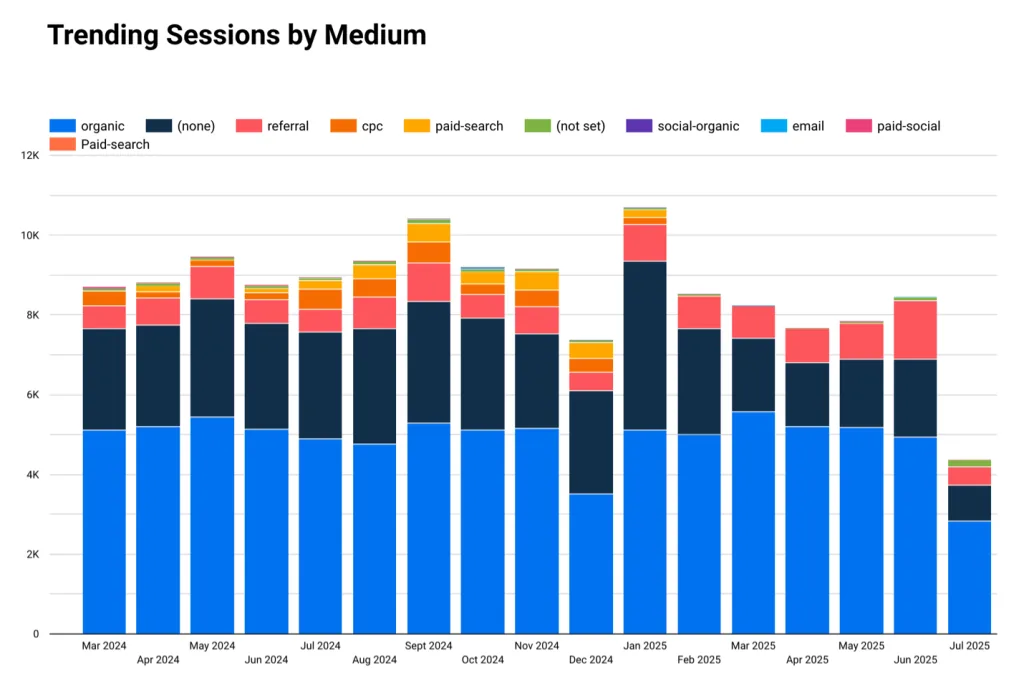
The best part? It's completely free and requires no technical expertise to use once it's been set up.
Beyond GA4: Multi-Source Dashboards
Looker Studio's real power comes from its ability to connect multiple data sources into a single dashboard. You can combine:
- GA4 for website analytics and user behavior
- Google Ads for paid search performance
- Meta Ads and LinkedIn Ads for social advertising
- YouTube Analytics for video performance
- Mailchimp or HubSpot for email marketing metrics
- Microsoft Clarity for heatmaps and session recordings
This consolidation means you can see your entire marketing performance - paid media, organic, email, and engagement - in one place.
“A custom Looker Studio dashboard surfaces the metrics marketers actually care about, without the unnecessary complexity of navigating GA4 directly.”
Thomas Thornton, Marzipan
Real-World Impact
One of our clients came to us struggling to understand traffic peaks and troughs on their website. They were making assumptions about what was working and what wasn't, but couldn't back it up with data because GA4 was too difficult to navigate.
We built a custom Looker Studio dashboard that revealed their actual results contradicted their initial assumptions. Channels they thought were underperforming were actually their strongest lead sources, and vice versa. That dashboard now informs their weekly team meetings and has fundamentally changed how they allocate their marketing budget.
Getting Started
If GA4 has been a source of frustration for your team, Looker Studio is the solution. It doesn't replace GA4 - it makes GA4 usable. And with the right dashboard design, it can become the single source of truth your marketing team has been missing.

Written by
Thomas Thornton
Head of Advertising, Data & Analytics
Thomas combines web development experience with hands-on digital marketing. With over 10 years experience in the industry, he has worked on different size teams from across the globe and is best known for his PPC skills.
More articles by Thomas